Bhoomi Online is an official land records website started by the Government of Karnataka. It helps to people check the land details online without visiting government offices. And you can view RTC Pahani, land owner information, mutation status, and other land-related records in few steps.
This service is mainly useful for farmers, land owners, buyers, and anyone dealing with land in Karnataka.
Land Record Services Available on Bhoomi Online Portal
What is Bhoomi Online ?
Bhoomi Online is a land records management system developed by the Karnataka government. In the early days, people go to the village offices multiple times to get the land-related records, but now the Bhoomi online portal has changed the process quickly and easily, and users can view and download land records using basic details like district, taluk, village, and survey number.
Is Bhoomi Portal Safe and Reliable
Yes, the Bhoomi Online portal is completely safe and reliable. It is managed by the Karnataka Revenue Department. The information shown on the portal comes from the official government land records department. It makes it reliable for verification and documentation purposes.
How to View RTC (Pahani) Online
RTC Pahani is one of the most searched services on Bhoomi Online. RTC means Record of Rights, Tenancy, and Crops.
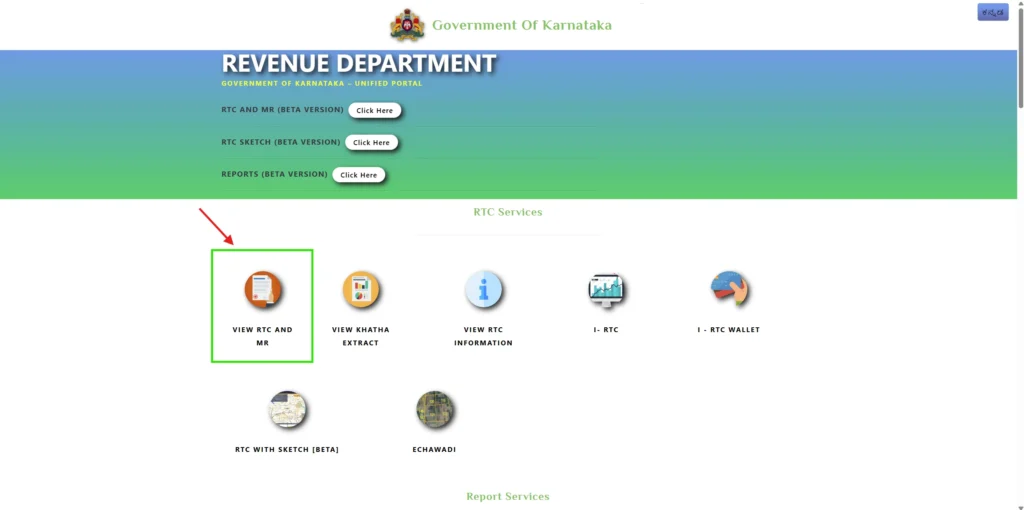
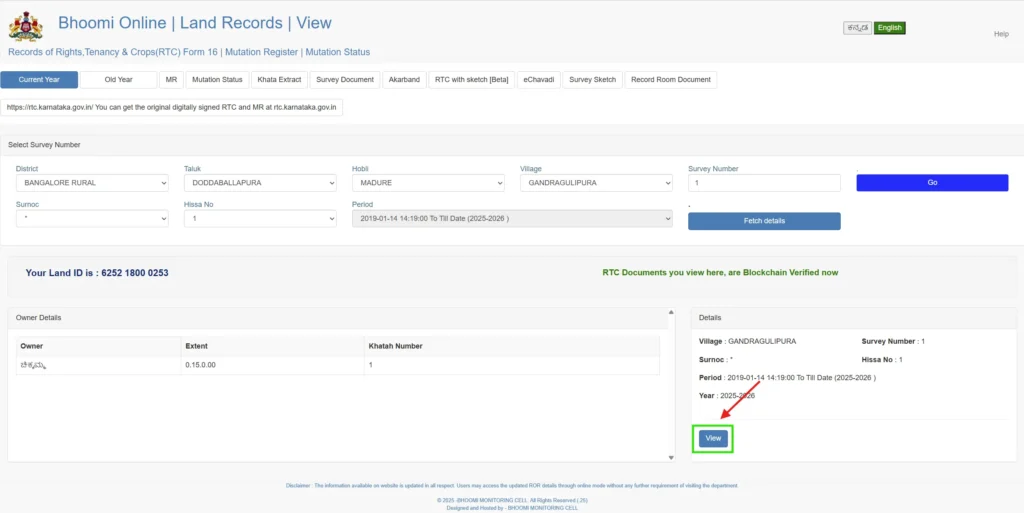
- Go to the official website, Bhoomi Portal Website. Click the ‘View RTC and MR’ option to access your land records and mutation report.
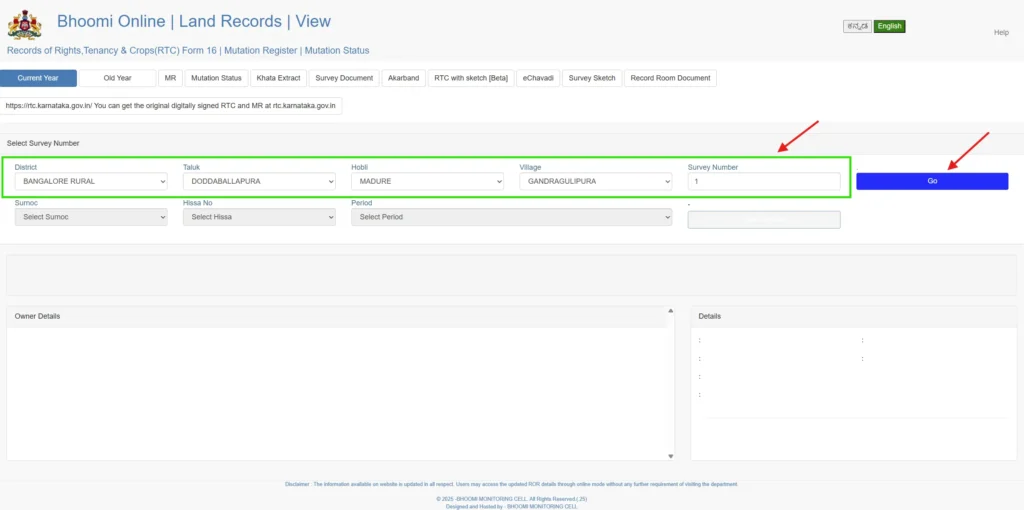
- Choose the current or old year and provide the details accurately, District, Taluk, Hobli, Village, Survey Number, and then hit the ‘GO‘ button.
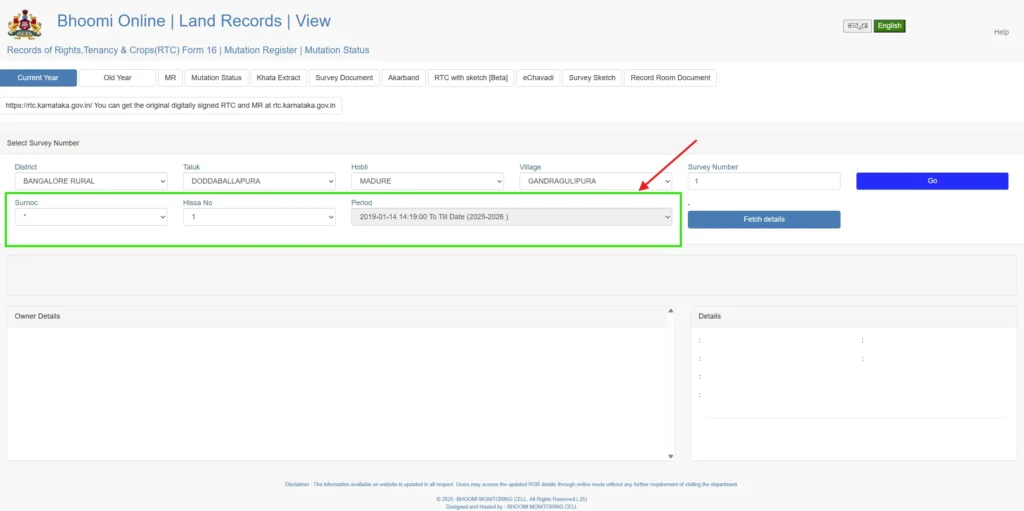
- Now select the Surnoc and Hissa No.
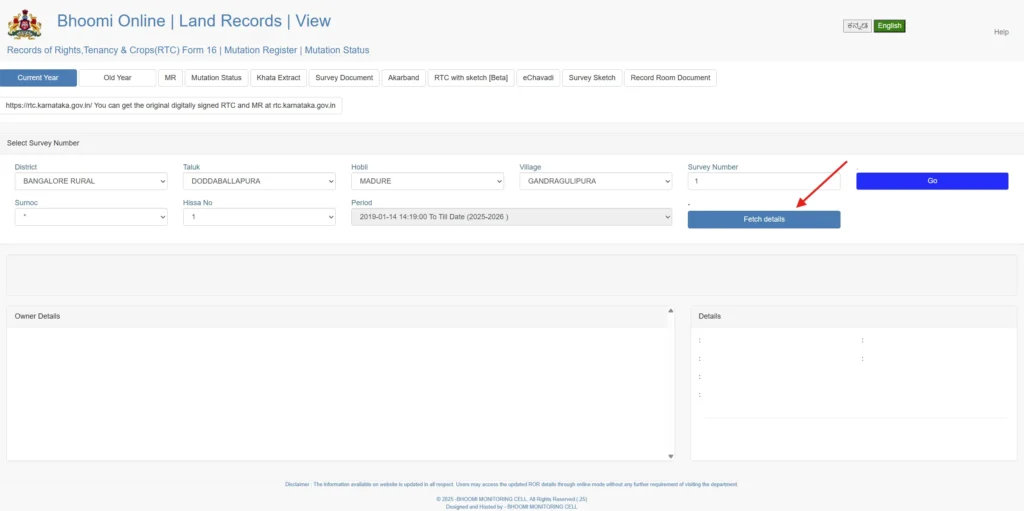
- Once all the information is entered, click the ‘Fetch Details’ button to retrieve your land records.
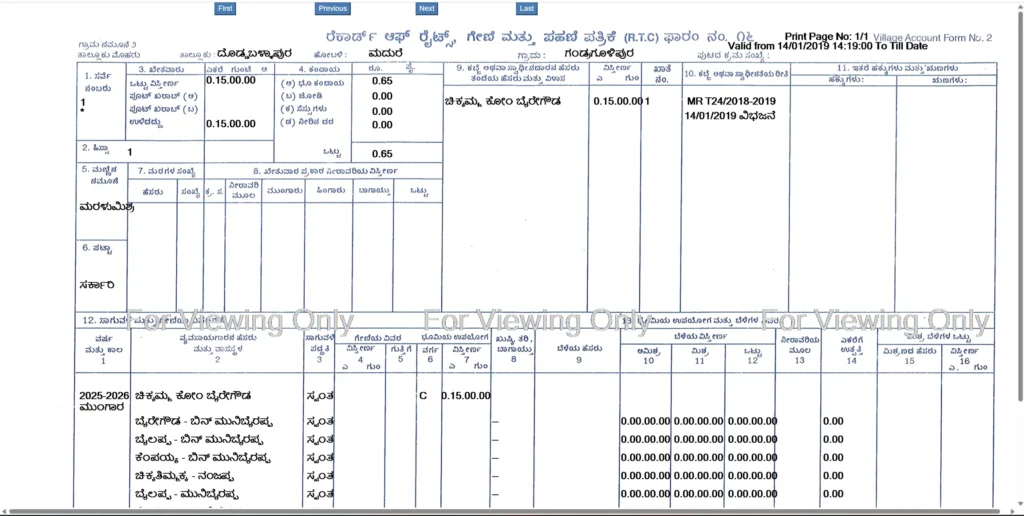
- Your RTC (Pahani) details will appear on the screen. You can also download or print the document for your records.
How to Check Mutation Status Online
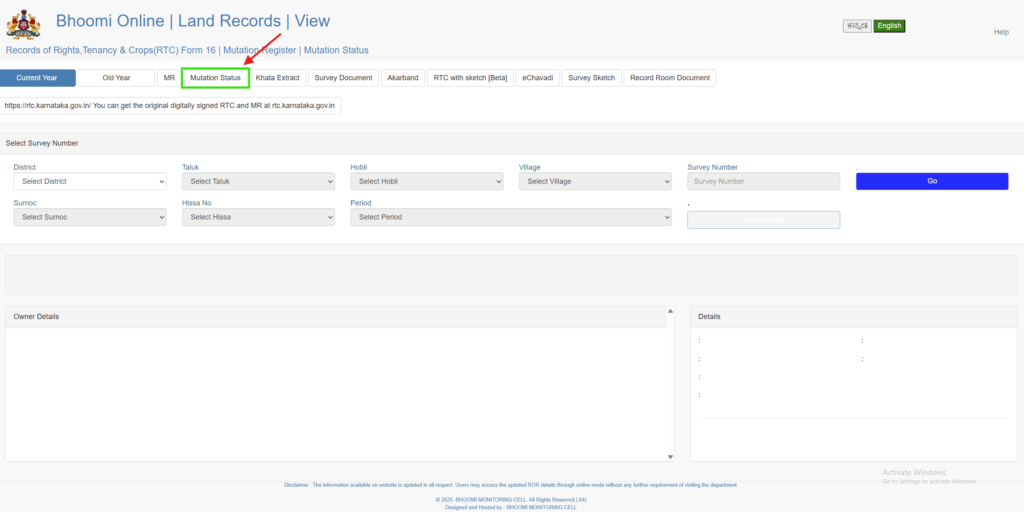
- Visit the https://landrecords.karnataka.gov.in page and click on the ‘View RTC and Mr’ section from your dashboard. And then click the Mutation status button.
- Fill in the required details:
- District
- Taluk
- Hobli
- Village
- Survey Number
- Surnoc No.
- Hissa No.
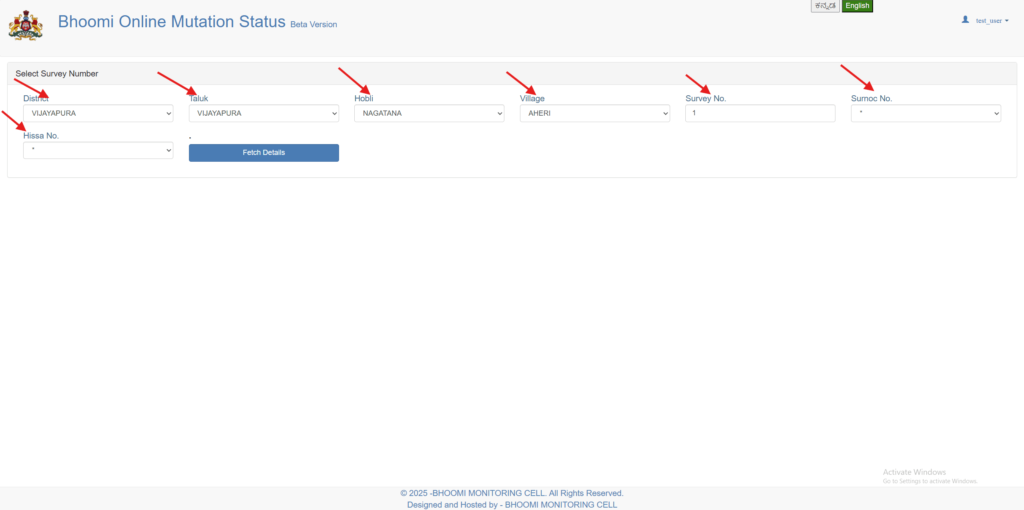
- Click ‘Fetch Details’ to view your mutation application status.
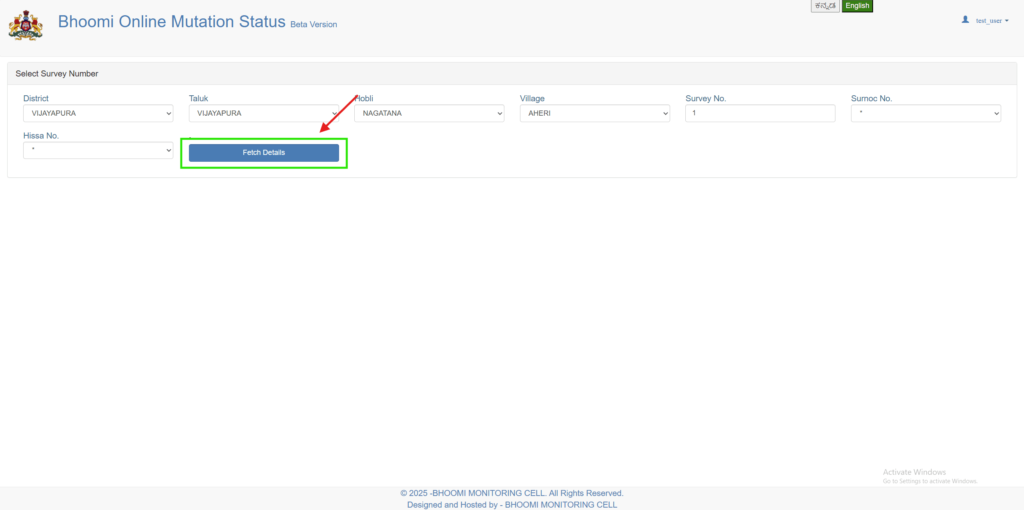
- Once you’ve entered all the required information, click the ‘Fetch Details’ button.
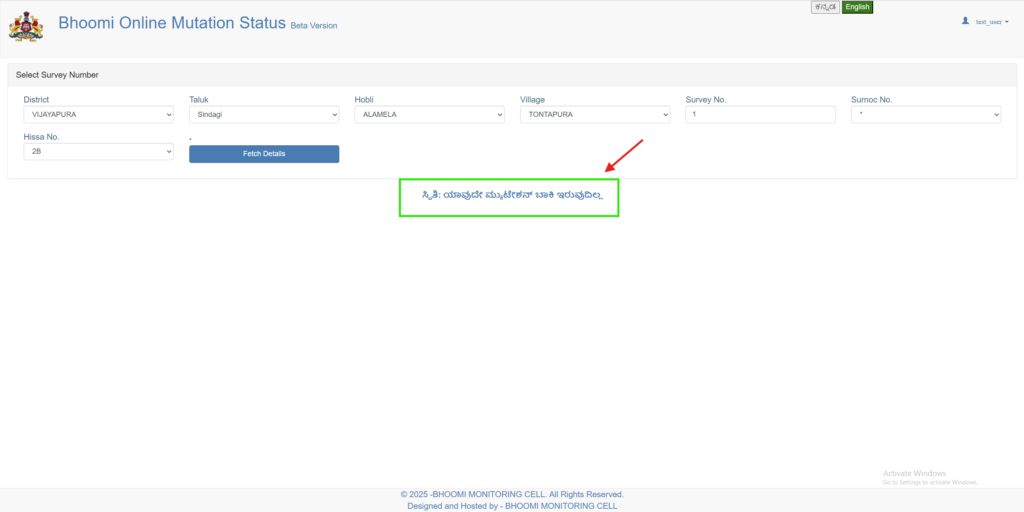
- The system will display your land’s mutation status, including:
- Current status (Approved, Pending, Rejected)
- Mutation reference number
- Application date
- Owner details
How to Check Revenue Maps
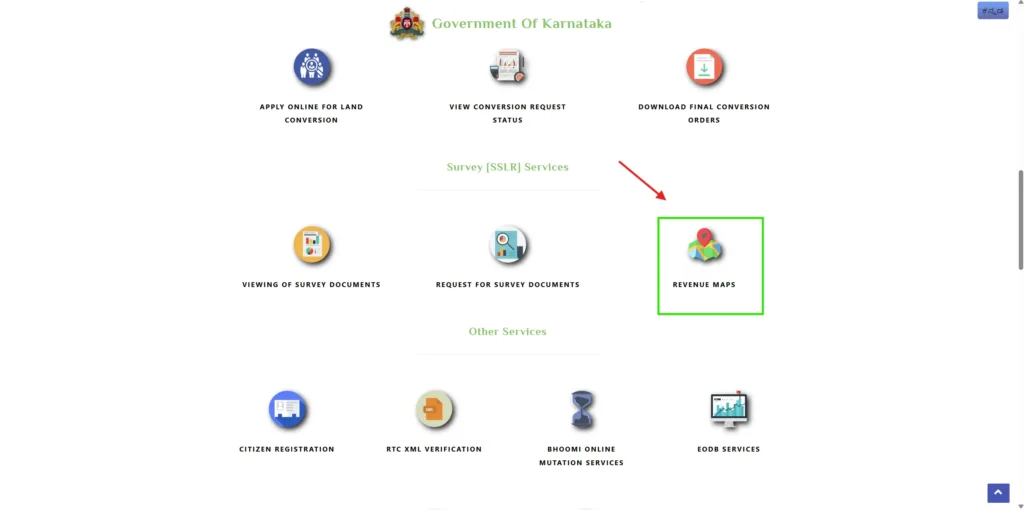
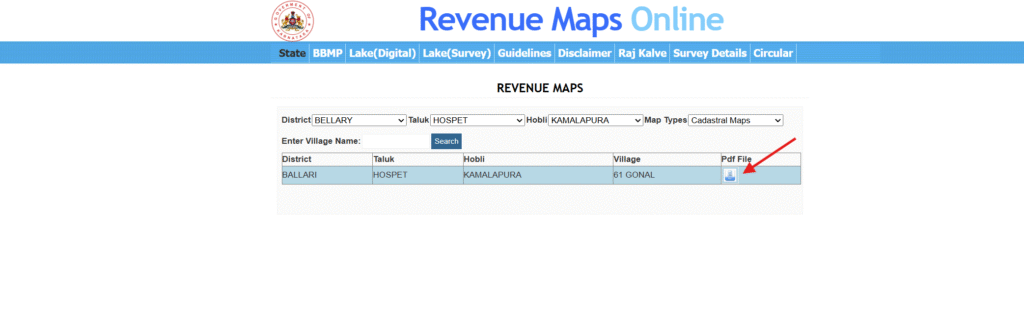
- In the homepage, select “Revenue Maps” under the Survey [SSLR] Services section. It will redirect you to the map viewing section.
- Select your District, Taluk, Hobli, and Map Types from the dropdown menus, enter your village name, and then click on the ‘Search’ button.
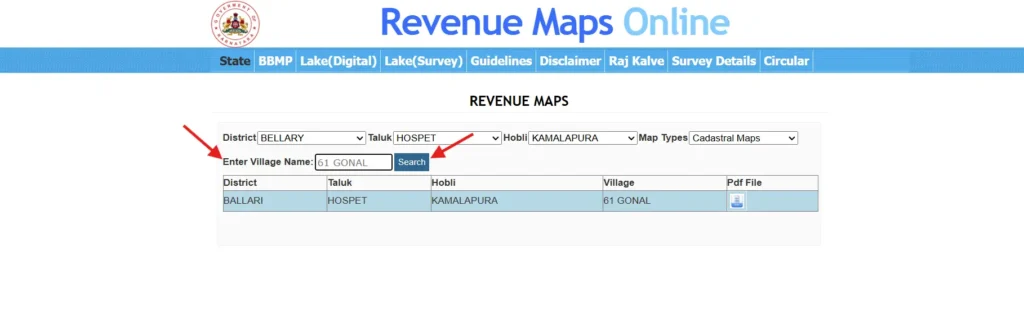
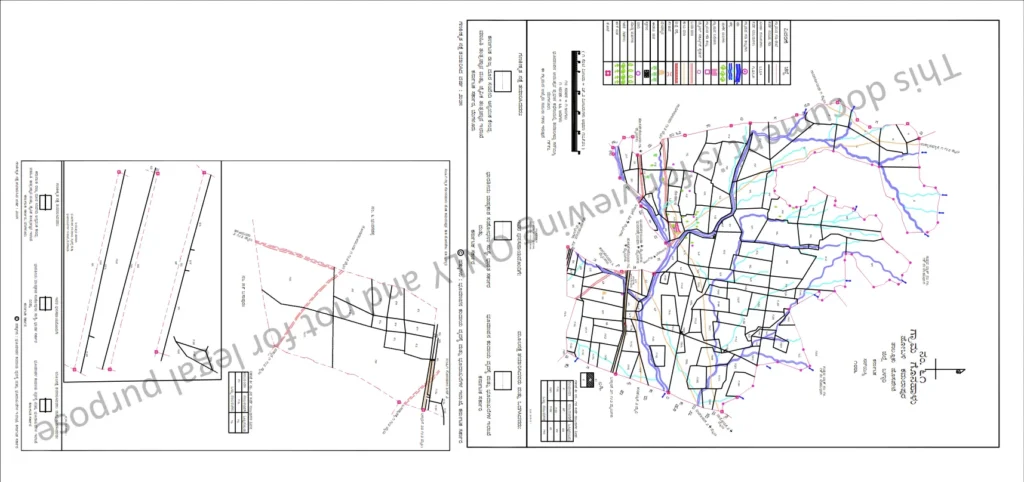
- The available map list will be shown on screen. Click the Pdf icon and view the map; it’s also available for download.
How to Check Affidavit-Based Land Conversion Status
- Visit the Land Conversion Website and choose the report types like
- Pendency with RD User
- Pendency Report with Request ID
- Pendency with Other Departments
- Pendency of UPOR Report
- Disposed Request
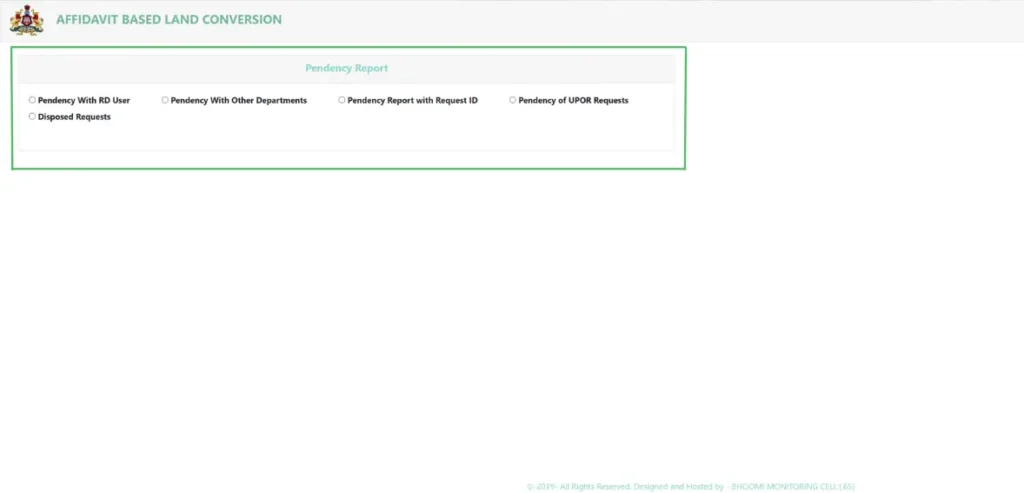
- After selecting your report type, enter the District. You may also need to enter other details, like the Request ID, if you selected that option and click ‘Fetch Report’ to see the status of your application.
I–RTC Wallet (Integrated RTC Wallet)
This wallet allows users to easily pay for various land-related services online, such as RTC (Record of Rights, Tenancy, and Crops) copies, mutation extracts, and more.
How to Register IRTC Wallet
To use this wallet, you first need to register on the Bhoomi portal:
- Visit the I-RTC Wallet service.
- Enter your User ID, Password, and Captcha, then click on the ‘Proceed’ button.
- If you are new, choose ‘Create Account’ and fill in the required details to create your account.
How to Add Funds to Your Wallet
- After logging in, go to the ‘IRTC Wallet’ section.
- Click on ‘Add Money’.
- Enter the amount you want to add.
- Select your preferred payment method (such as Debit Card, Net Banking, or UPI).
- Complete the payment money will be added to your wallet.
How to Use the I-RTC Wallet for Payments
When paying for a land document service:
- Select the service you want (e.g., RTC, mutation extract).
- At the payment page, choose ‘Pay using IRTC Wallet’.
- The required amount will be deducted from your wallet.
Fees & Charges on Bhoomi Online RTC Services
| Service Name | Fees (Approx.) |
|---|---|
| Viewing RTC (Pahani) Online | Free |
| Downloading RTC Copy (for personal reference) | ₹10 to ₹15 per RTC |
| Mutation Extract | ₹15 to ₹20 per extract |
| Tippan Copy (Land Sketch) | ₹15 to ₹20 per copy |
| MR (Mutation Register) Details | ₹10 to ₹15 per record |
| Land Conversion Request Status Check | Free |
| Survey Number Search | Free |
Bhoomi Online Contact Details
080-22113255, 8277864065, 8277864067, 8277864068
bmchelpdesk.s@gmail.com, bhoomi@karnataka.gov.in
SSLR Building, K.R. Circle, Bangalore – 560001
FAQs about Bhoomi online
1. What is the time limit for mutation of land in Karnataka?
In Karnataka, the mutation process usually takes upto 30 days from the date of application. If all documents are correct and there are no objections, it may be completed faster. In case you have disputes or missing documents, it can take longer time.
2. What is a podi in land records?
“Podi” means a subdivision of land. It is the process of dividing a survey number into smaller parts to sell the land or divide for family members. After podi, new survey numbers are assigned for each portion.
3. How long does it take to convert land in Karnataka?
Land conversion for example, agricultural to non-agricultural use generally takes 2 to 4 months. The timeline is based on document verification, approvals from local authorities, and documents are submitted properly.
4. How can I check Khata online in Karnataka?
If the property is in Bengaluru, you can check Khata details online through the official portal of Bruhat Bengaluru Mahanagara Palike. You need property details like the assessment number or the PID number to view the Khata status.
5. How to view EC online in Karnataka?
You can view the Encumbrance Certificate online through the Kaveri Online Services portal. After registering and logging in, select “Online EC,” enter the property details, and download the certificate for the required period.
6. What is Pahani property?
Pahani is also called RTC (Record of Rights, Tenancy and Crops). It is the land record document of Karnataka. It contains details like owner name, survey number, land extent, crop details, and type of land.
7. How to open RTC in mobile?
You can open RTC on your mobile by visiting the official Bhoomi portal of Bhoomi Online using a browser. Click the ‘View RTC and MR’ option. Enter the district, taluk, hobli, village, and survey number to view and download the RTC copy.